Introduction
Generating single-stain controls is a critical step for the correct unmixing of spectral cytometry datasets. This is because unmixing relies on the fundamental assumption that the measured performance of fluorochromes in control samples accurately represents the performance of those same dyes when they stain experimental samples as part of a complete panel.
One common way this assumption is violated is cross-contamination of control samples. Whether it is caused by pipetting error or carryover during acquisition, if not corrected, contamination can compromise outputs for all samples that use the afflicted control(s) for unmixing.
How do you know if a control is contaminated? Opportunities for detection are provided by the visualizations produced in a given workflow. In this post, we compare the Resolve workflow to a conventional workflow, and demonstrate tooling built into Resolve that helps identify and remediate contamination in controls so that they may still be used for the correct unmixing of full stained samples.
Contamination in Conventional Workflows
Before we built Resolve, our lab would follow a conventional workflow and use the instrument-provided unmixing tool. In this workflow, we'd typically set a lineage gate followed by a positive gate on each control file, and then examine the provided ribbon plots and estimated spectra for evidence of problems. A typical control would produce a visualization like the following, where we see data from a control stained by BUV737 conjugated to anti-CD127.

To many trained operators, this view is unremarkable. Contrast this to the plot produced by a control for BV570 conjugated to anti-CD56 that has been contaminated by events stained with BV480 conjugated to anti-CD45RA.

Here, the range of intensities on detectors UV7, V6, YG1 (and their neighbors) indicate a serious problem has occurred. Experienced operators may recognize contamination as a likely cause and attempt to remediate it via gating. Gating as remediation is only possible when the contaminating dye is dissimilar: one needs to select a detector where the contaminant emits light and the intended fluor does not in order to set a remediation gate.
As panels expand, however, the fluorophores used increasingly crowd the emissions range, and the chance of similar dyes contaminating one another increases. Consider the following plot generated by a control for BV605 conjugated to anti-CD25.

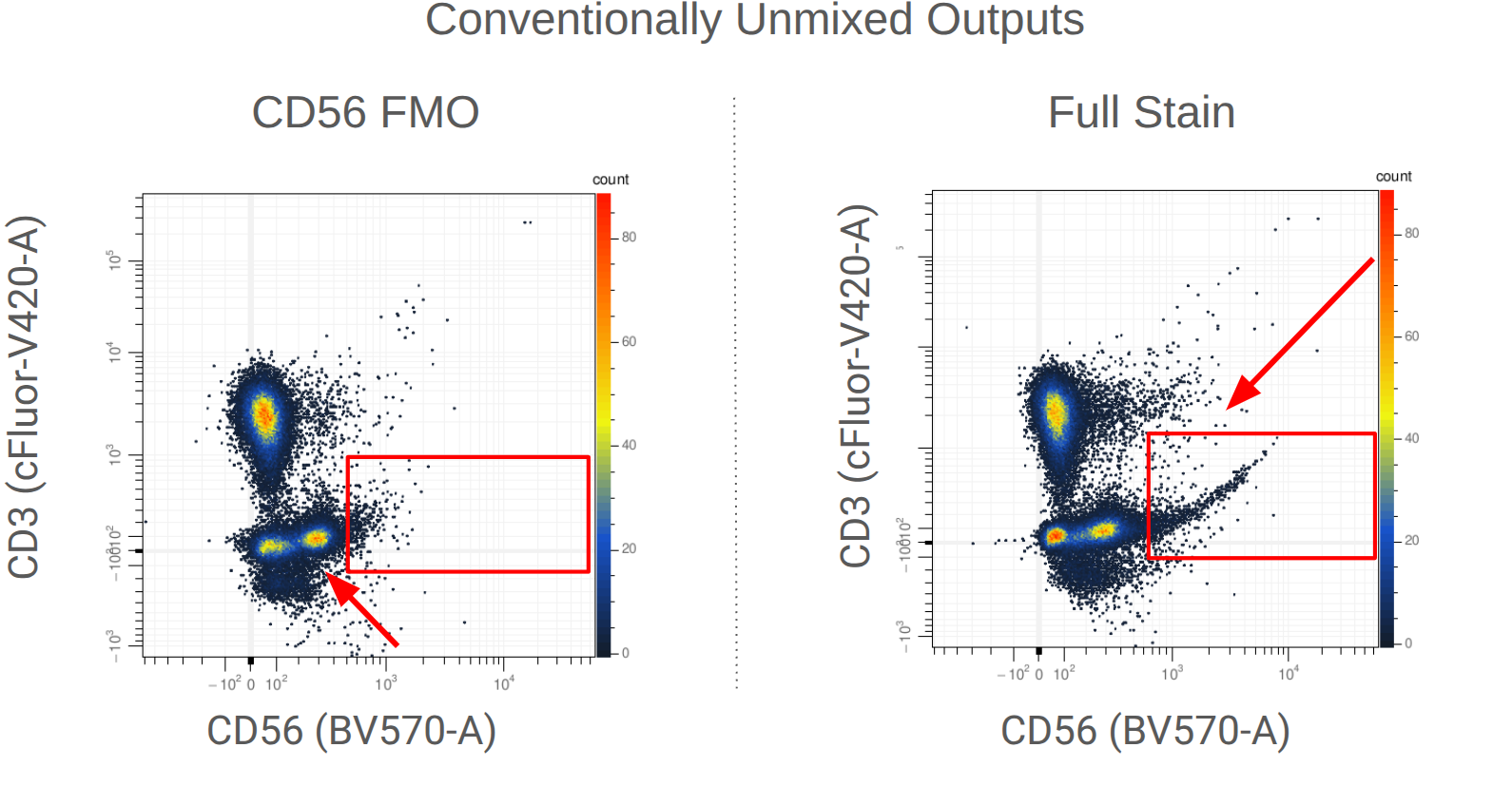
Is this control capturing the performance of the fluorophore when stained at the panel's titre? Or do problems lurk beneath the surface? In these data, we can infer problems by looking at N x 1 plots of the conventionally unmixed outputs, where odd patterns emerge.
The Problem
When an analyst encounters these patterns, they are put in a difficult position: are the double peaks and the upward-tilting expression tail in the full-stain sample biological signals or artifacts of the unmixing process? By generating FMOs, we can interpret the double peak as an unmixing artifact. But if the upward tail is an artifact, it can cause problems in downstream analysis: if you aim to characterize NKT cells, for example, this kind of pattern can inflate false-positive or false-negative rates.
Because of this risk, analysts often attempt to address such artifacts through manual compensation, applying a 'correction matrix' to the unmixed files. This is not recommended: compensation introduces subjective bias into the analysis, and can introduce errors into other parameters. The ideal way to address this kind of artifact is in the unmixing step itself — but this raises the question: which controls caused the problems, and can the controls be salvaged?
The Resolve Solution
The Resolve "control set" workflow is designed to make identification and remediation of contaminated control files easy. A "control set" is simply a collection of single stained and unstained control files that can be used to unmix fully stained experimental samples. In its simplest incarnation a control set is defined by a single unstained control and one control per fluorophore in a panel.
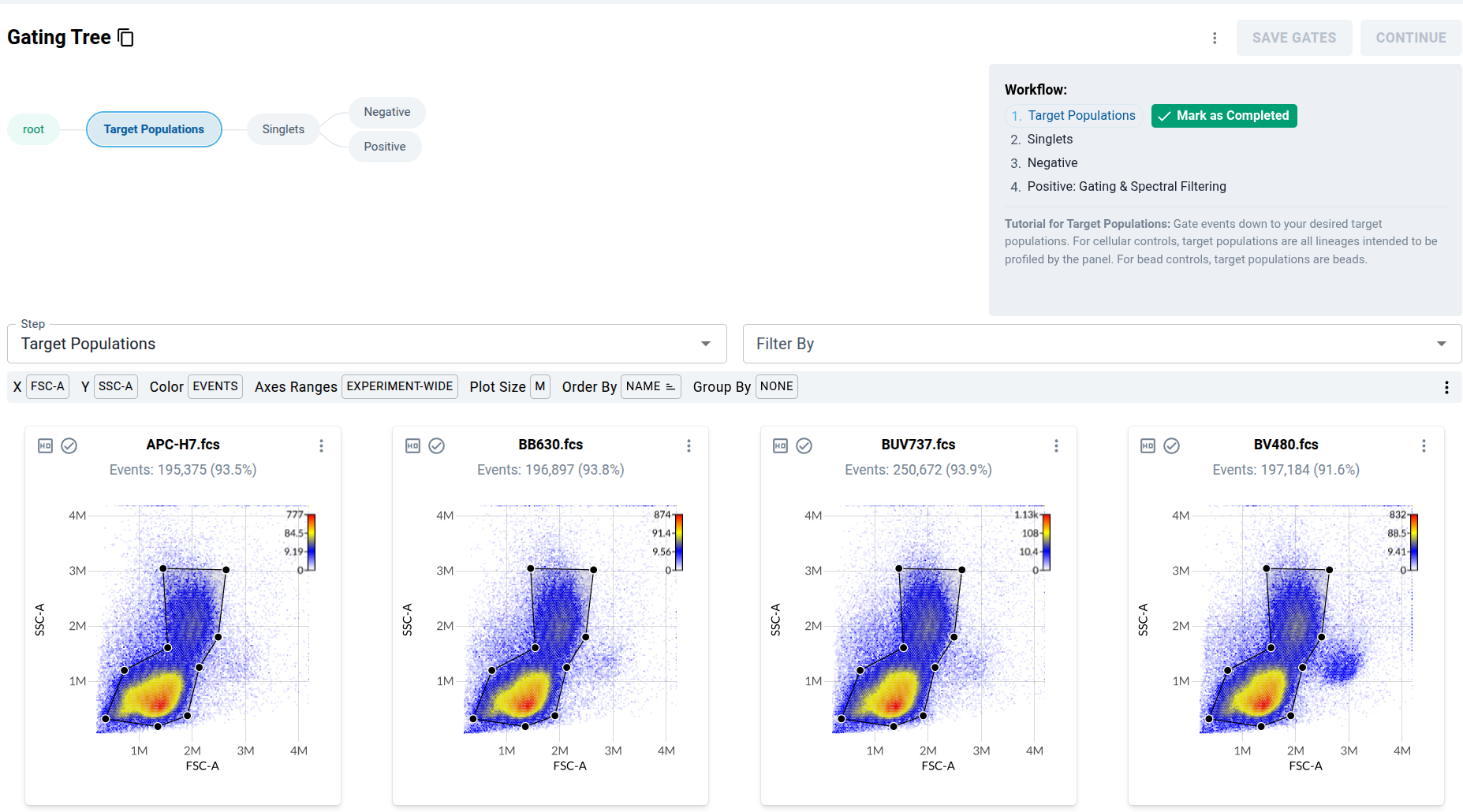
The workflow begins with a template gating tree being applied to each control, allowing users to identify events within each control file that are profiled by the panel.
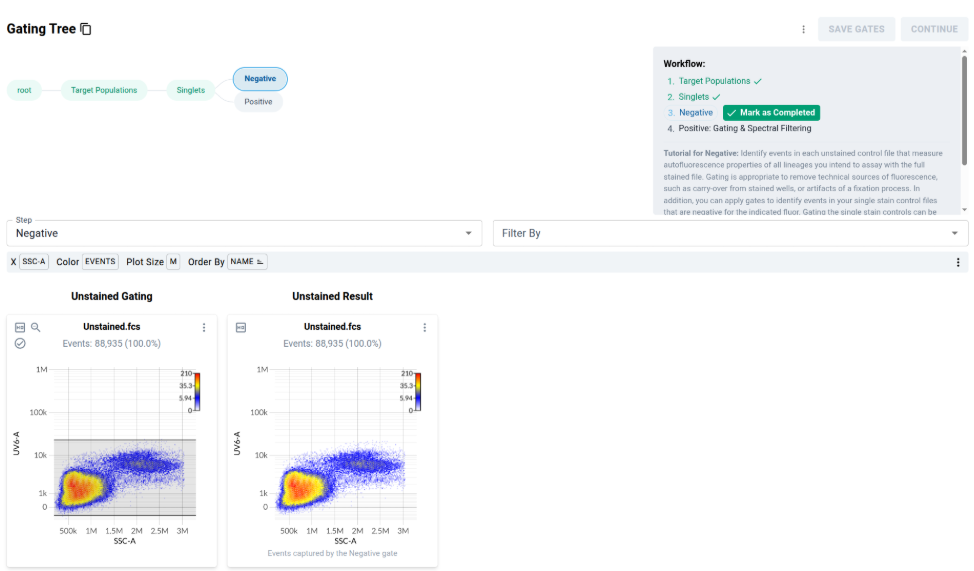
Once you have gated down to events within the targeted lineages, you are provided a view of your unstained controls. You may apply gates here to remove contaminants from unstained files, or to gate "internal negatives" within single stained controls.
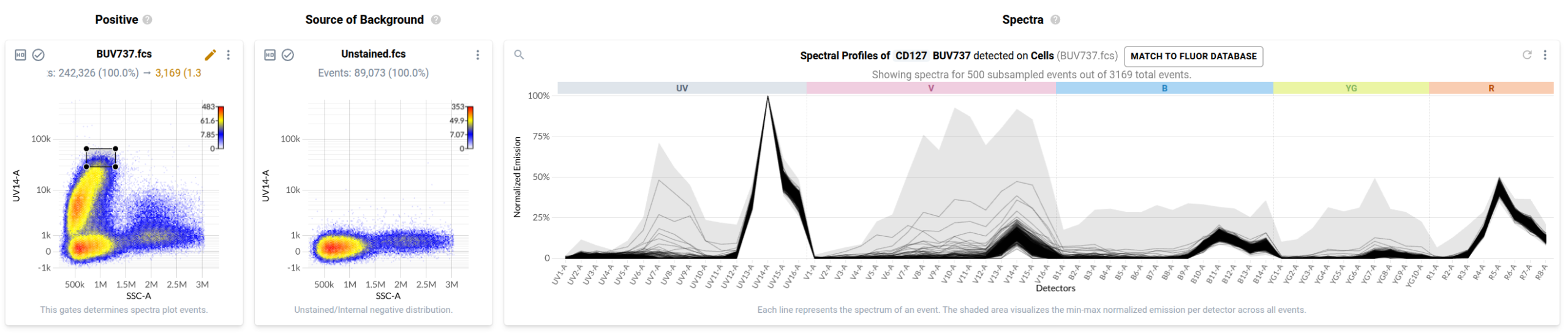
In the final step, users identify events in each control labelled with the fluorophore-conjugated antibody or fluorescent dye. Resolve provides event-level views of the spectra measured in your single stained controls in a purpose-built spectral plot. Here's the default view for the anti-CD127 BUV737 control.
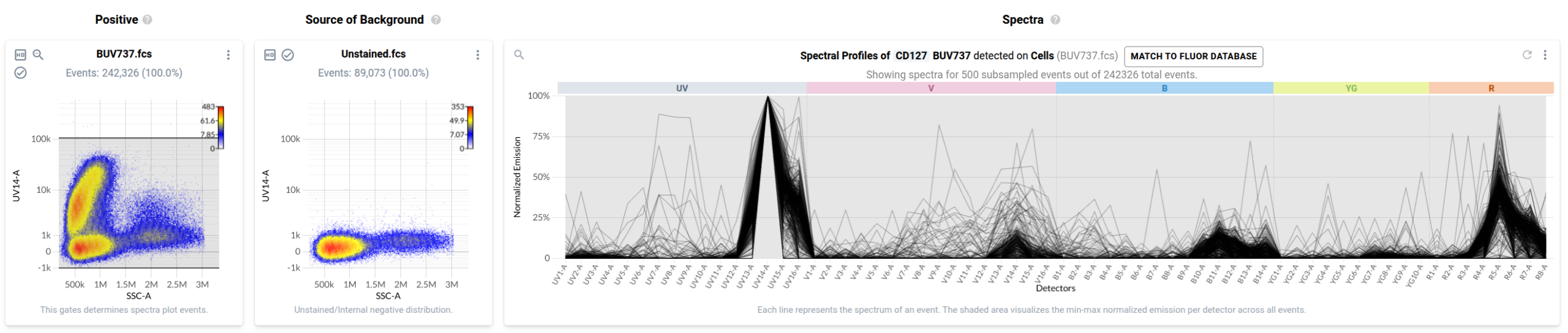
The component labelled "Positive" shows the gated lymphocytes and monocytes with side scatter on the x-axis and the peak detector on the y-axis. "Source of Background" shows data from the unstained control on the same parameters. The "Spectra" component shows estimated spectra for events within the positive gate. We can update the gate to only capture bright (presumably stained) events, and the spectral plot updates accordingly.
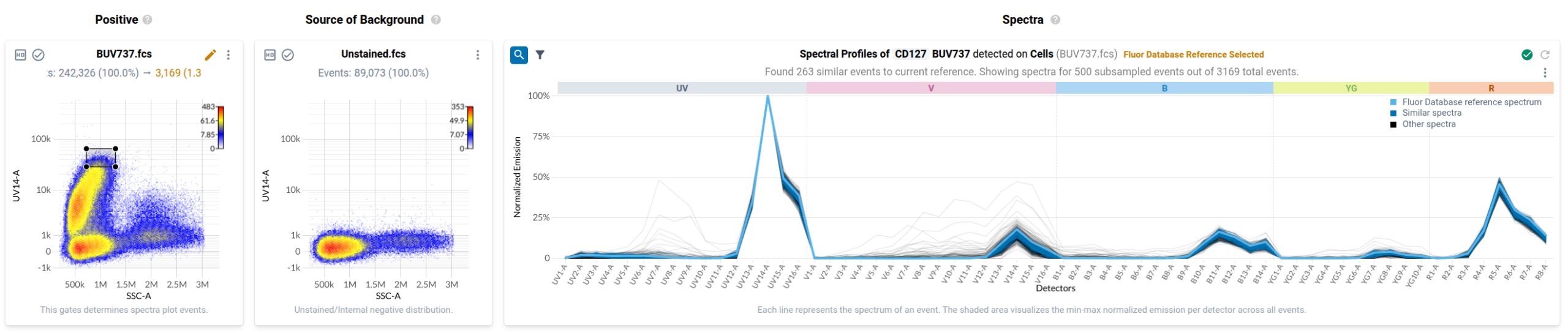
One powerful tool is the ability to compare gated events to a reference spectrum. The reference spectra in Resolve were generated by the Ozette lab team in Seattle. You can have Resolve find the events in your file most similar to this reference at the click of a button.
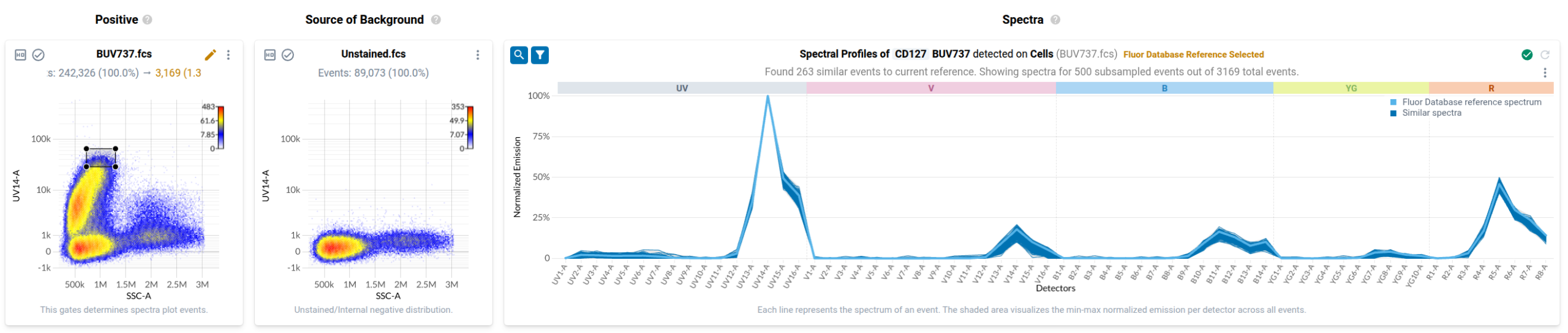
The reference spectrum is only a starting point: experimental conditions can change the shape and relative height of secondary emission peaks. Users are encouraged to manually select a positive empirical reference in their data and filter against that selection, since the empirical evidence in the control offers the best information about each fluorophore's emission profile on their device. Outliers can be removed from the view with the funnel icon, leaving only the positive filtered events.
Rescuing Contaminated Controls with Resolve
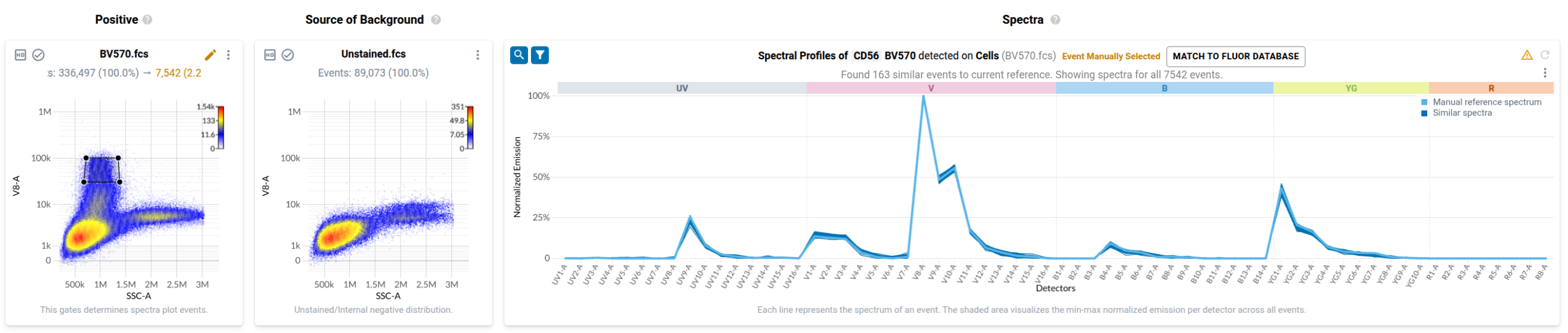
Now let's examine how Resolve helps remediate contamination. We return to the control labelled with anti-CD56 conjugated to BV570, which was contaminated by events labelled with anti-CD45RA conjugated to BV480. After gating positives, we see the clear mixture of the BV570 and BV480 emission patterns.
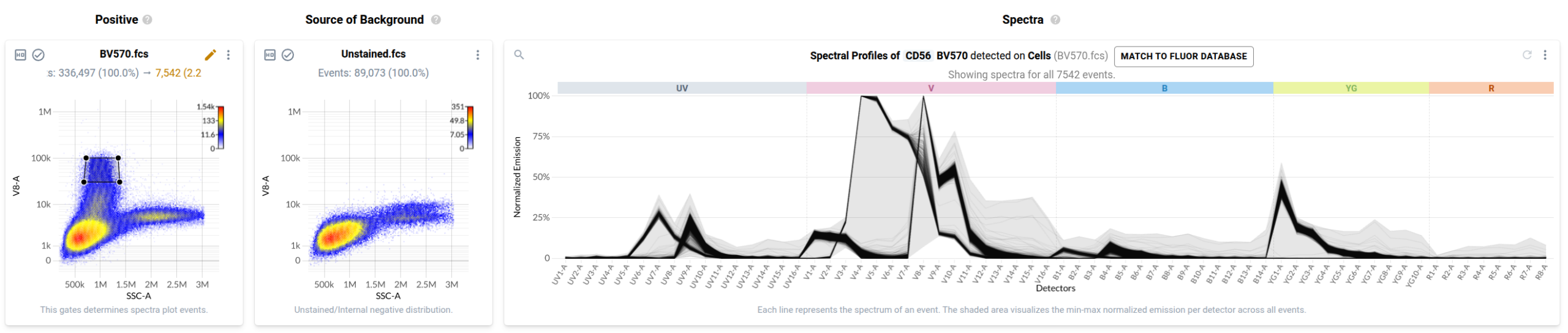
By selecting and filtering relative to a BV570 positive event, we can easily exclude the contaminating BV480 signal, and confirm exclusion by showing only the positive events.
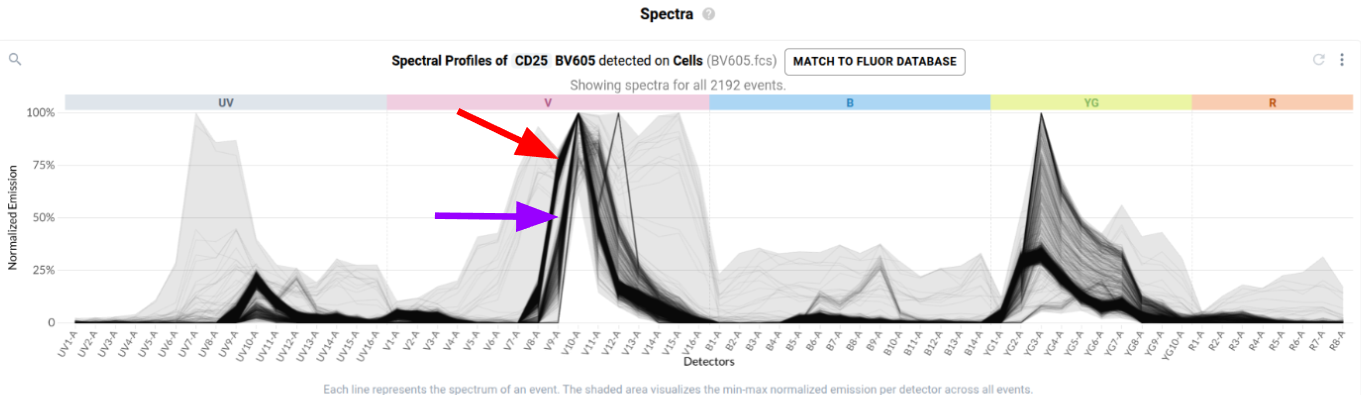
As a final example, we return to the control labelled with anti-CD25 conjugated to BV605. The spectral plot makes it clear that there are two similar but distinct spectral patterns — this control was contaminated by events labelled with anti-CD4 conjugated to cFluor V610.
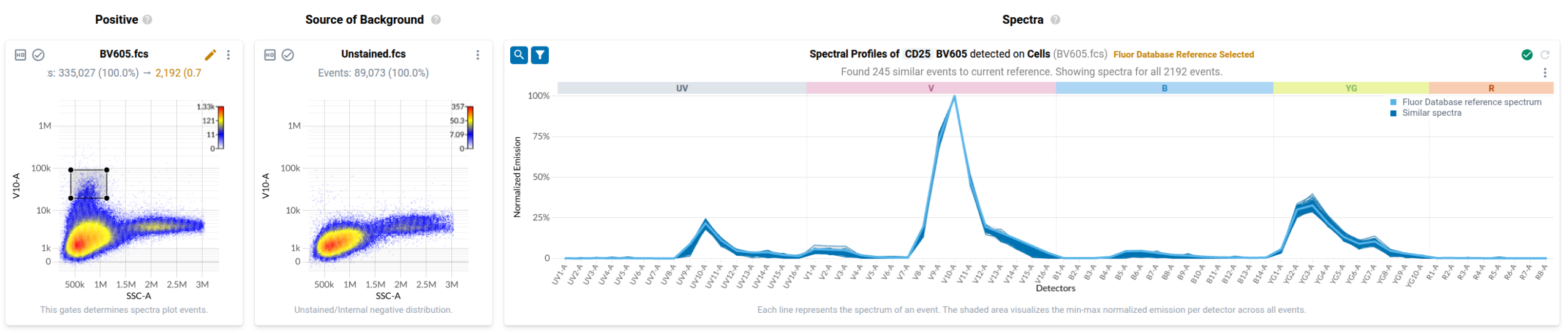
By filtering relative to Ozette's fluorophore database, we can disentangle this mixture to identify the events stained by BV605, and confirm the contamination is fully removed.
Maximizing Quality with Resolve
The three examples show how the Resolve spectral filtering workflow identifies true positive events in both contaminated and uncontaminated files. It is the same workflow in all cases, making it easy to find and fix contamination errors. The cumulative effect becomes clear when we unmix fully stained data and re-examine the earlier pair plot.
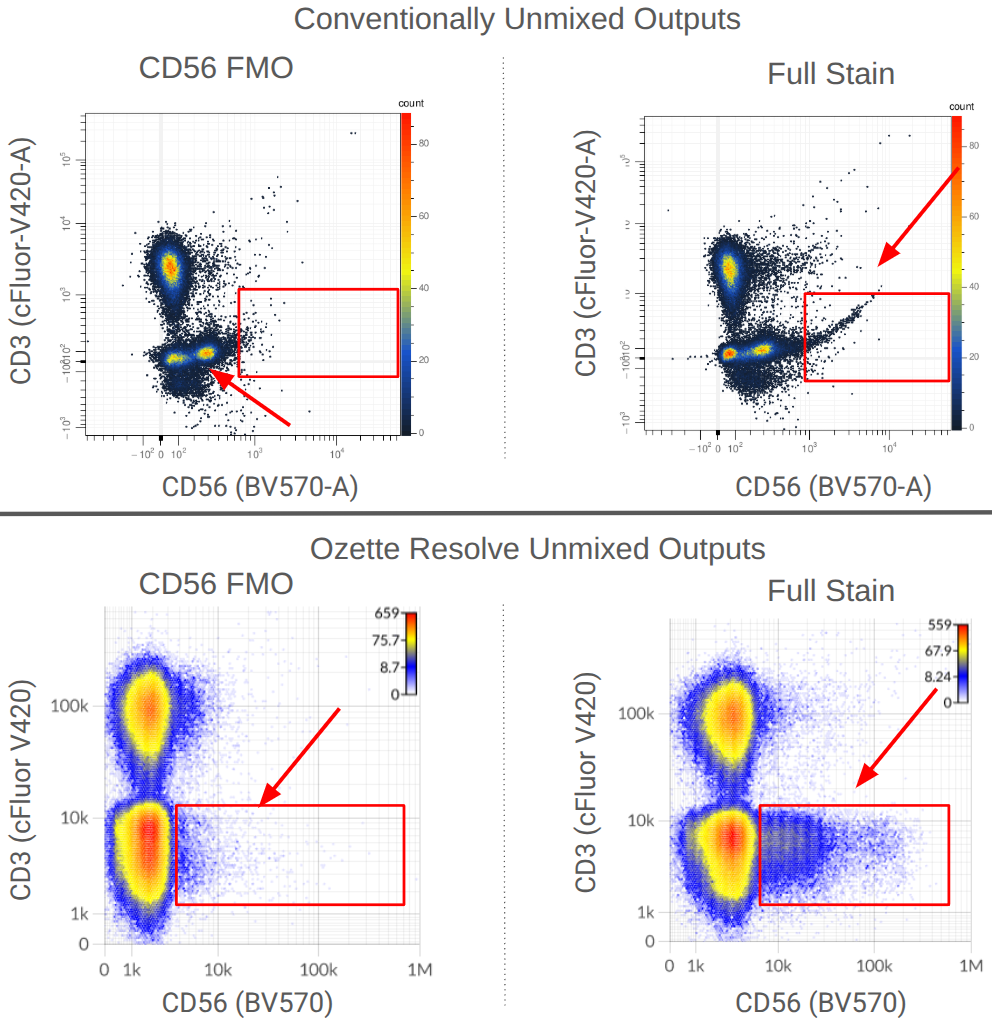
Where before we saw an artifactual double peak and an upward-curving expression tail, in the Resolve outputs these unmixing artifacts are eliminated. One reason is spectral filtering; another is the mathematical model Resolve uses, which only produces non-negative outputs and recovers the total raw measured signal across all detectors (on average) for each event — so the scale of Resolve output typically differs from conventional approaches.
Concluding Remarks
We have seen how the Resolve spectral filtering workflow can automatically surface and fix cross-contamination errors. As this kind of error is inevitable, it's a particularly powerful component of Resolve, preventing mistakes from introducing error into unmixed outputs. It can also save costs at the bench: users can salvage contaminated controls they've already generated, rather than going back to the lab to generate another set of reference controls.
In our next post, we discuss how the mathematical model used by Ozette Resolve takes advantage of the spectral filtering workflow to generate high-quality outputs. In the meantime, if you'd like to try the spectral filtering workflow with Resolve today, ask us about our free demo.
← All posts